Introduction
This laboratory introduces research data management practices in the context of open and reproducible science. Students will work through the final steps of the lifecycle of a research dataset, from organization and documentation to publication and dissemination. Please be aware that the dataset you select for this lab will be used in Lab 3.
This laboratory consists of three main components:
Selecting a dataset for publication based on the required criteria.
Preparing the dataset for sharing by organizing the files and completing the required documentation according to best practices.
Submitting the dataset to Borealis with sufficient metadata and documentation.
Dataset Selection
You must choose between the following two options.
Option 1 — Own Research Data (Recommended)
Use unpublished research data from your own work or laboratory activities.
Option 2 — Existing Public Dataset
Select an existing published dataset that is not already hosted on Borealis.
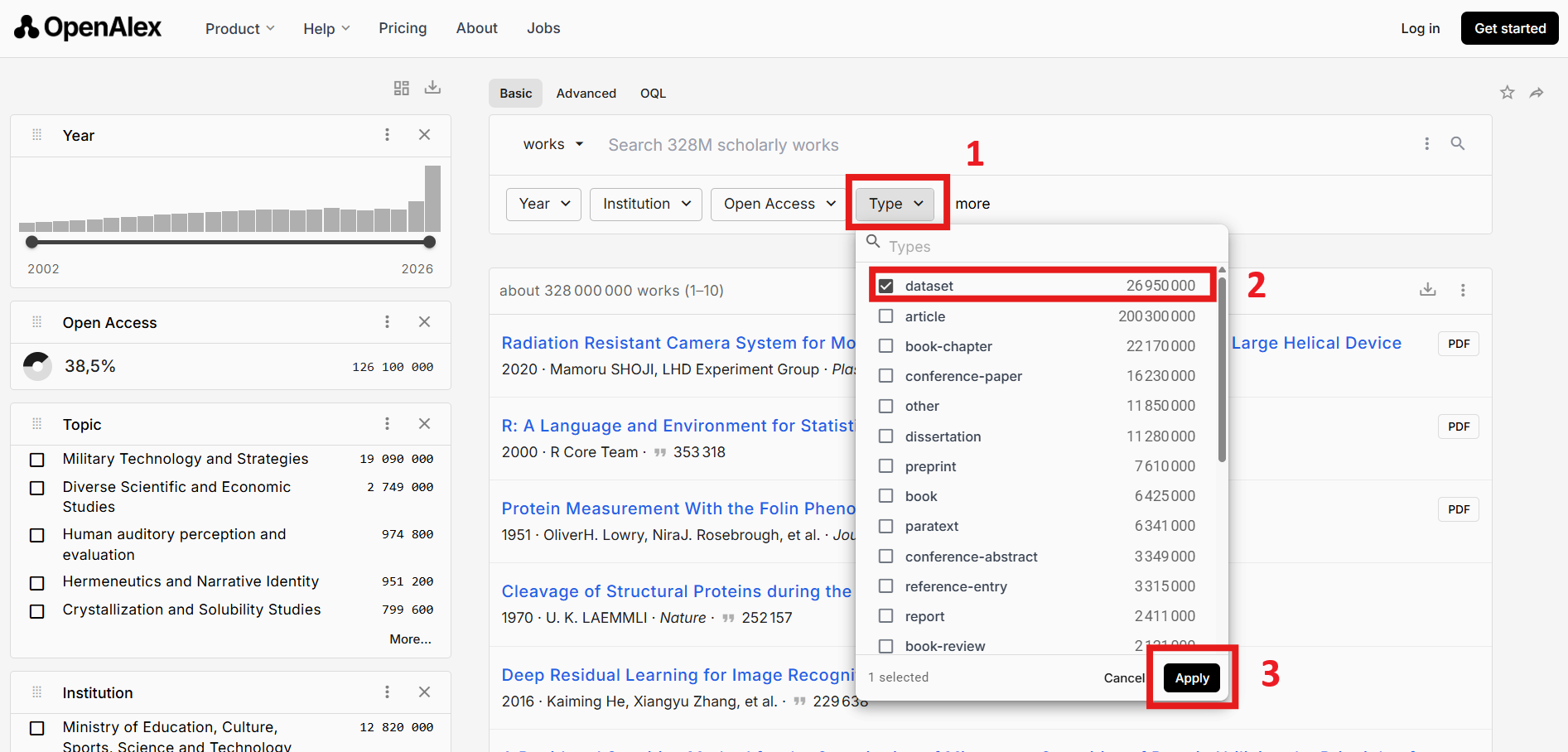
You can identify a dataset using OpenAlex:
https://
Finding a dataset using OpenAlex
OpenAlex is a database that you can use to identify research outputs, including datasets and dataset-associated publications.
You should:
In the “Type” field, select “Dataset”
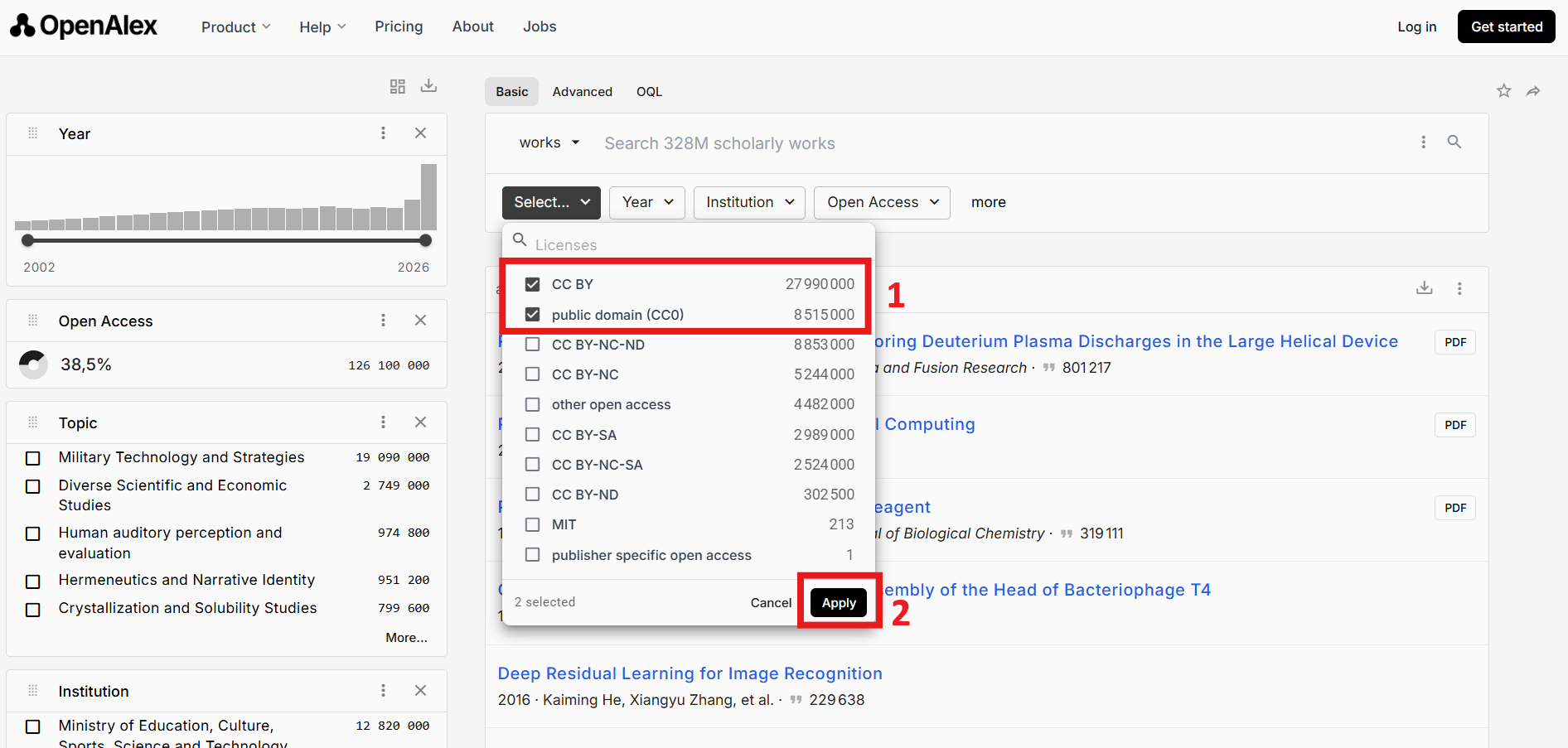
In the “License” field, select “CC0” or “CC-BY”.
Use additional fields that you consider important.
Select a result that corresponds to a dataset in your domain that you’d like to use for Lab 2.
Ensure that the dataset is accessible and comes from a reliable source. We also suggest to pick a dataset that not too large (<1GB). Example of a “small” dataset is one that is smaller than 100 MB.
Identify if there are any publications (articles, data papers, conference papers, etc.) or code repositories associated with the dataset and download a copy.
License requirement (CC0 / CC-BY only)
You may only reuse datasets released under one of the following licenses:
CC0 
Public domain dedication — no rights reserved.
CC-BY 
Creative Commons Attribution — reuse permitted with credit.
These licenses are commonly used in open science and ensure compatibility with redistribution in Borealis.
You must verify the license explicitly by checking:
the dataset repository page (preferred);
the authors’ data availability statement;
Data Organization and Standardization
Community Standards
Try to identify identify whether a community standard applies to your data.
Examples include:
BIDS (neuroimaging);
OME-TIFF (microscopy);
Preparing the dataset for upload
Modify the dataset as you see fit so that it follows best practices discussed in class. Including
clear naming conventions;
consistent structure;
minimal unnecessary compression.
Documentation
README File
Your project must include a README.md file containing (when applicable):
dataset origin and provenance (cite the original authors);
description of the dataset’s structure;
explanation of variables (columns, rows, formats);
Any modifications you have many to the original dataset;
software requirements (if certain files are in proprietary formats);
usage instructions;
associated publications;
licensing and citation information.
Remember that your README should be sufficient for another researcher to understand and reuse your dataset independently. Try to include as much information as possible, and anything else you judge pertinent to facilitate others’ interpretation of the dataset.
Report
Prepare a brief report (3-4 sentences) describing the rationale behind your dataset selection. For example, explain what analysis you are planning to perform with this dataset and why it is suitable for your project. Save this report as dataset_selection_report.md and include it as part of the documentation uploaded with your dataset on Borealis.
Dissemination Strategy — Borealis Dataverse
This section describes the publication workflow for research datasets using the Borealis platform (demo environment). The dissemination process is a key component of FAIR data practices (Findable, Accessible, Interoperable, Reusable).
The workflow is divided into: data deposit, data publication and versioning of the dataset.
Platform Access and Account Setup
You must verify access to the ING8100 collection on the Polytechnique Montréal Demo Dataverse:
Course Dataverse Structure
A shared Dataverse has been created for this lab:
Name:
ING8100 - Fall 2026
This serves as the parent container for all student submissions.
Dataset Publication Workflow
You must publish your dataset in Borealis following these steps:
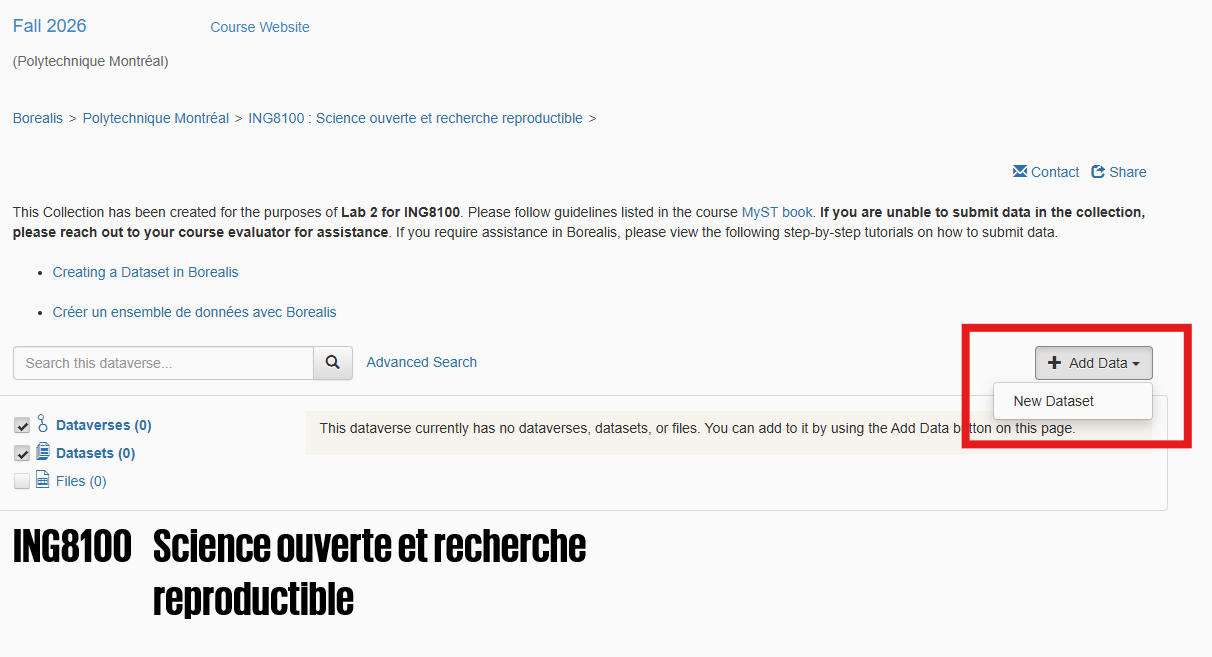
Create Dataset
Inside ING8100 - Fall 2026, create a new dataset via Add Data → New Dataset.
Metadata Entry
Complete all of the following required metadata fields before publishing your dataset:
Title
Author
Point of Contact
Description
Subject
Keyword
Related Publication --> Only if applicable
Data Source
Upload Data
Upload all dataset files ensuring:
clear naming conventions;
consistent structure;
minimal unnecessary compression.
License Definition
Assign a license appropriate to your dataset:
ensure that it is the same as the license associated with the original dataset;
Save Dataset
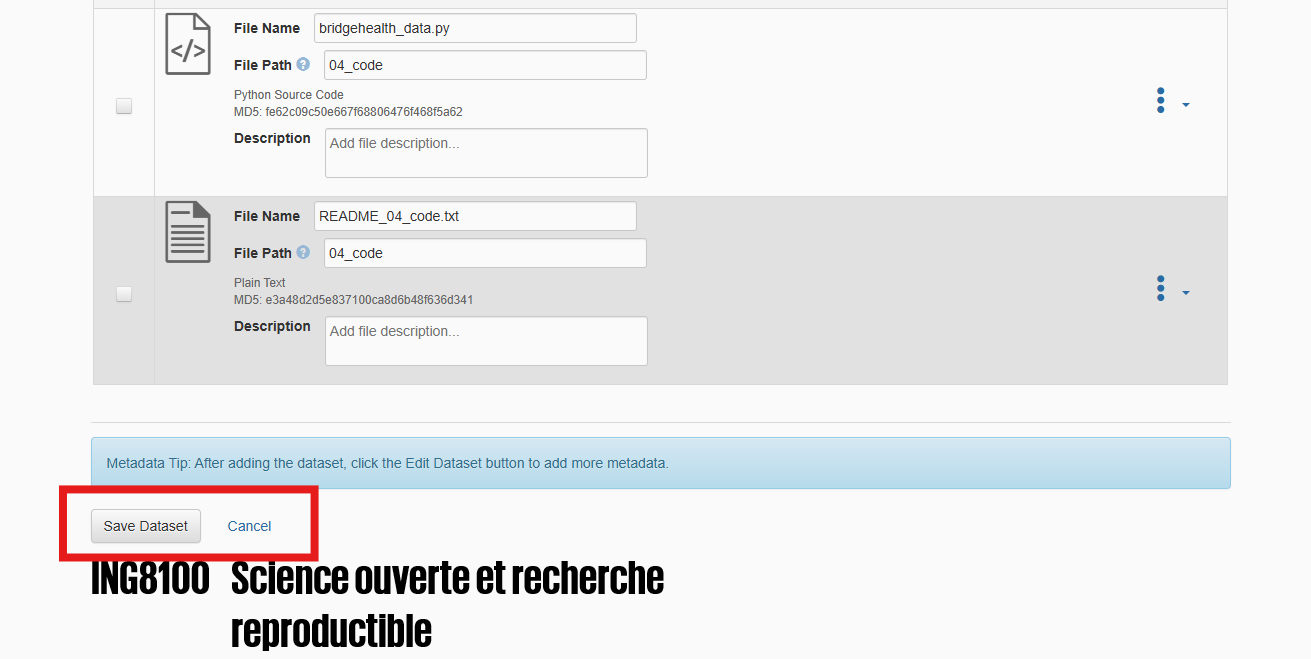
Once you have completed added the metadata and license and uploaded the data, select Save Dataset. This will create a draft (unpublished) version of your dataset, visible only to you and the course evaluators. Make any further modifications to the dataset by choosing Edit Dataset.
Add your collaborator
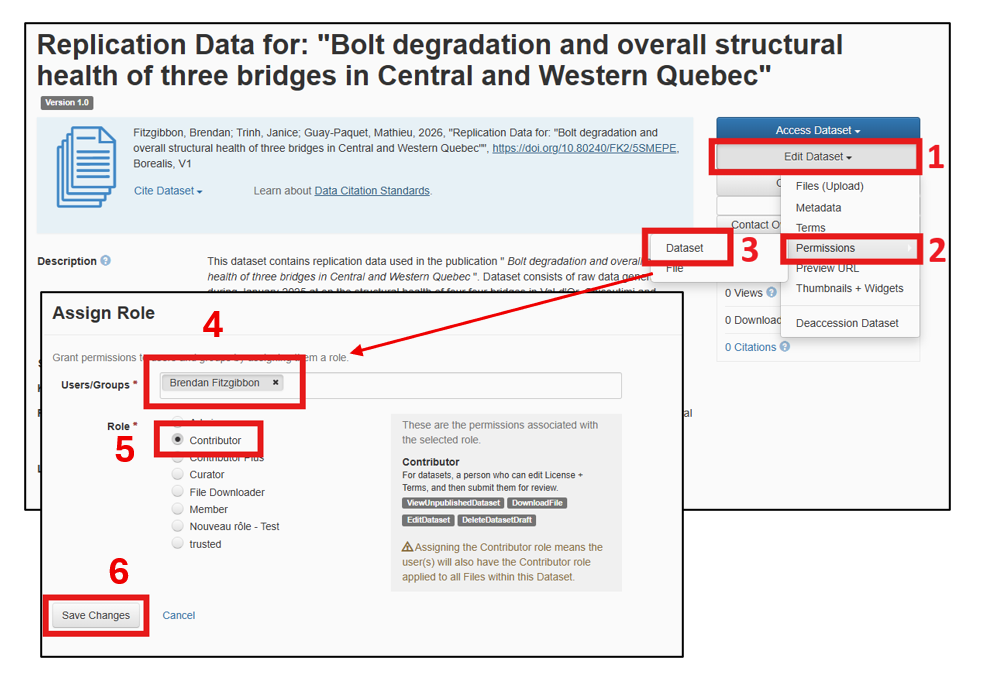
So that both you and your teammate have access to the dataset, you will need to add them as a collaborator.
to do this select Modify dataset → Permissions → Dataset → Assign roles to users/groups. Select their account and give them the role Contributor, then click on Save changes.
File-level editing
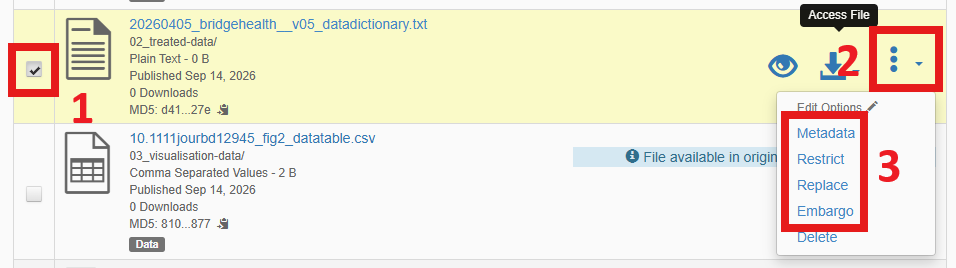
Add embargoes, tags, or descriptions for specific files by following these steps;
In the “Files” tab, select all files that you wish to add edits to.
With the files selected, click on Edit Files and choose one of the following options
Metadata : to add a description for the selected files, or to add the “Documentation”, “Data” or “Code” tags to the file(s) to describe its contents.
Restrict : to require users to request access in order to download the file
Embargo : to restrict access to the file until a certain date has passed.
Submit for Review
Submit your dataset to change its status to draft (in review) so that the course evaluators can review it before publication.
Dataset Evolution and Versioning
After your initial upload to Borealis, you must perform controlled modifications to your dataset in order to generate a new version and document its evolution. When you edit your published dataset, a new draft (unpublished) version of your dataset is created. You can then repeat the steps above before submitting it for review by the instructors again.
This step is required to demonstrate dataset versioning practices commonly used in research data management systems.
Dataset modifications
You must apply at least one modification to the dataset you already uploaded on Borealis. Examples include:
adding new data files;
removing incorrect or irrelevant data;
correcting an error in the dataset;
updating metadata or file structure;
modifying preprocessing decisions.
Evaluation
The evaluation emphasizes the application of research data management best practices, including documentation, metadata, versioning, and organization.
| Criterion | Weight | Description |
|---|---|---|
| Version Control | 20% | Version history is coherent, commit messages are meaningful, semantic versioning is used appropriately. |
| License | 10% | An appropriate open-source license is included and is compatible with the selected dataset. |
| README.md | 20% | The README clearly documents the dataset. For example: repository structure, variables, preprocessing steps, software requirements, usage instructions, and citation information. |
| Metadata | 20% | Metadata is complete, accurate, and sufficient for another researcher to discover, understand, and reuse the dataset. |
| Folder Structure | 10% | The repository is organized using a clear structure. Example: raw data, processed data, code, and documentation are separated and clearly identified.Folder and file names are consistent, descriptive, and meaningful. |
| Dataset Report | 15% | The report clearly justifies the dataset selection by describing its source, authorship, associated publication (if applicable), and relevance to the laboratory objectives. |
| File-Level Editing | 5% | Appropriate use of Borealis file-level editing features to improve the organization and management of the dataset. |