Auditing a Research Project
For each of five components, ask a simple question, then rate it 🟢 (usable independently), 🟡 (usable with help), 🔴 (hard or impossible), or ⚪ (n/a):
| Component | Question |
|---|---|
| Data | Can the exact dataset be identified and accessed? |
| Code | Can the exact code version be retrieved? |
| Environment | Can the software environment be reconstructed? |
| Documentation | Can someone execute the workflow independently? |
| Governance | Would the project survive the departure of its main developer? |
Run this on one of your own projects — the result is usually the clearest motivation for the rest of this lecture.
Where an Open Project Actually Lives
An open project lives across several channels, each solving a specific problem: notebooks and docs (the entry point for a newcomer), issues (what is broken, planned, or decided), pull requests (why the code changed, not just that it did), discussions/forums (questions from people who are not you), CI (the claim that it still works, checked continuously), and releases (versions someone can cite). None of these were invented for industry — each replaces something a lab used to keep in one person’s head.
Shell and Notebooks
Shell commands, unlike menus, don’t change between OS versions and can be pasted into an issue, a README, or a methods section:
pwd; ls -la; cd; less; historyNotebooks are a great teaching medium, but they hide a trap: cells can be
edited and re-run out of order, so the code shown may not be the code that
produced the output. Try it yourself in the
course notebook:
change a variable, skip re-running a dependent cell, and watch the output go
stale. Kernel → Restart & Run All is the way to check whether a notebook
is even internally reproducible. Of 1.16 million notebooks on GitHub, only
24% ran without error and 4% reproduced their own stored outputs
Pimentel et al., 2019. Of roughly 27,000 notebooks attached to
biomedical papers, only 1,203 ran to completion, and 879 reproduced the
published result Samuel & Mietchen, 2024 — for a reproducible artifact,
convert the notebook to a script.
Contributing: Issues and Review
You don’t need to write code to contribute — a typo, a broken example, or a confusing error message is a real, useful report. A good issue is reproducible by a stranger: what you expected vs. what happened, the exact command and versions, the smallest failing example, and what you already tried. A bad issue costs the maintainer several round-trips to fix.
Some journals now check the code instead of just trusting it: JOSS reviews happen as a public GitHub issue where reviewers install and run the software; ACM’s Artifact Review & Badging prints badges for availability, functionality, and reproduced/replicated results. You’ll use the JOSS reviewer checklist yourselves in Lab 4.
CI: A Robot That Checks Your Work
A CI server runs your commands on every push, on a clean machine with none of your local mess. It answers one question — does this still work for someone who is not you? This course’s own site is built, translated to French, and deployed automatically by a GitHub Action on every push.
Governance
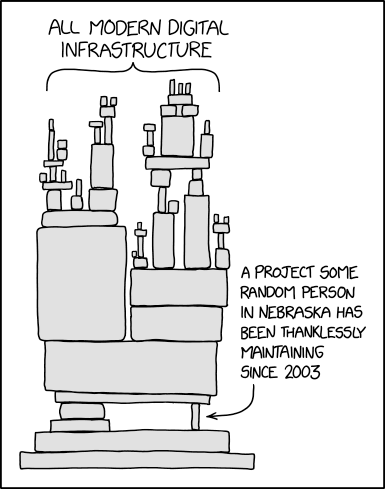
xkcd 2347, “Dependency” (CC BY-NC 2.5)
Your project depends on software nobody was funded to maintain; if it stops being maintained, your project can break with the next dependency or hardware change. Governance varies widely — from a single grant-funded lab team (SpineReport), to volunteer steering groups (BIDS), to industrialized maintenance (scikit-learn, PyTorch). The underlying question is always the same: who is allowed to say no, and who is paid to say yes?
For your own project, write down who actually owns each piece — the GitHub org and repo, the data folder, the compute allocation, the domain name — and ask: if that person’s account were deactivated tonight, what would you lose? Internal documentation (access, provenance, decisions, ownership, an exit checklist) can and should live in version control too — see NeuroPoly’s wiki as an example. And for data specifically: get consent for secondary uses at collection time, not later — retrofitting it is usually impossible.
Use of AI in Open Development
Use AI assistants well rather than pretending you didn’t: they genuinely
help with docs, tests, commit messages, and reading unfamiliar code. But
running the same prompt twice can yield different results (try it — compare
two models on the same task), and neither run is recorded anywhere. Good
practice is to commit the prompt alongside the code it produced (e.g., a
trailer like Assisted-by: Claude Opus 5), and to review AI-generated code
as you would a stranger’s pull request — you remain accountable for every
line. Several journals (JOSS, Wiley, Nature, Elsevier) now require an AI
usage disclosure — Resnik & Hosseini, 2025 discusses when such disclosure
should be mandatory, optional, or unnecessary.
Agentic AI — agents that open issues and submit pull requests with little human oversight — is a growing presence: contributing is now cheap, but reviewing is not, and some projects have started refusing AI-generated contributions outright.
Further Resources
BIDS and scikit-learn governance documents
- Pimentel, J. F., Murta, L., Braganholo, V., & Freire, J. (2019). A Large-Scale Study About Quality and Reproducibility of Jupyter Notebooks. Proceedings of the 16th International Conference on Mining Software Repositories (MSR), 507–517. 10.1109/MSR.2019.00077
- Samuel, S., & Mietchen, D. (2024). Computational Reproducibility of Jupyter Notebooks from Biomedical Publications. GigaScience, 13, giad113. 10.1093/gigascience/giad113
- Resnik, D. B., & Hosseini, M. (2025). Disclosing Artificial Intelligence Use in Scientific Research and Publication: When Should Disclosure Be Mandatory, Optional, or Unnecessary? Accountability in Research, 33(2), 2481949. 10.1080/08989621.2025.2481949